Economy
Give your server a full currency system — members earn, spend, gamble, trade, and compete on a wealth leaderboard, all configurable from the dashboard.
Setup
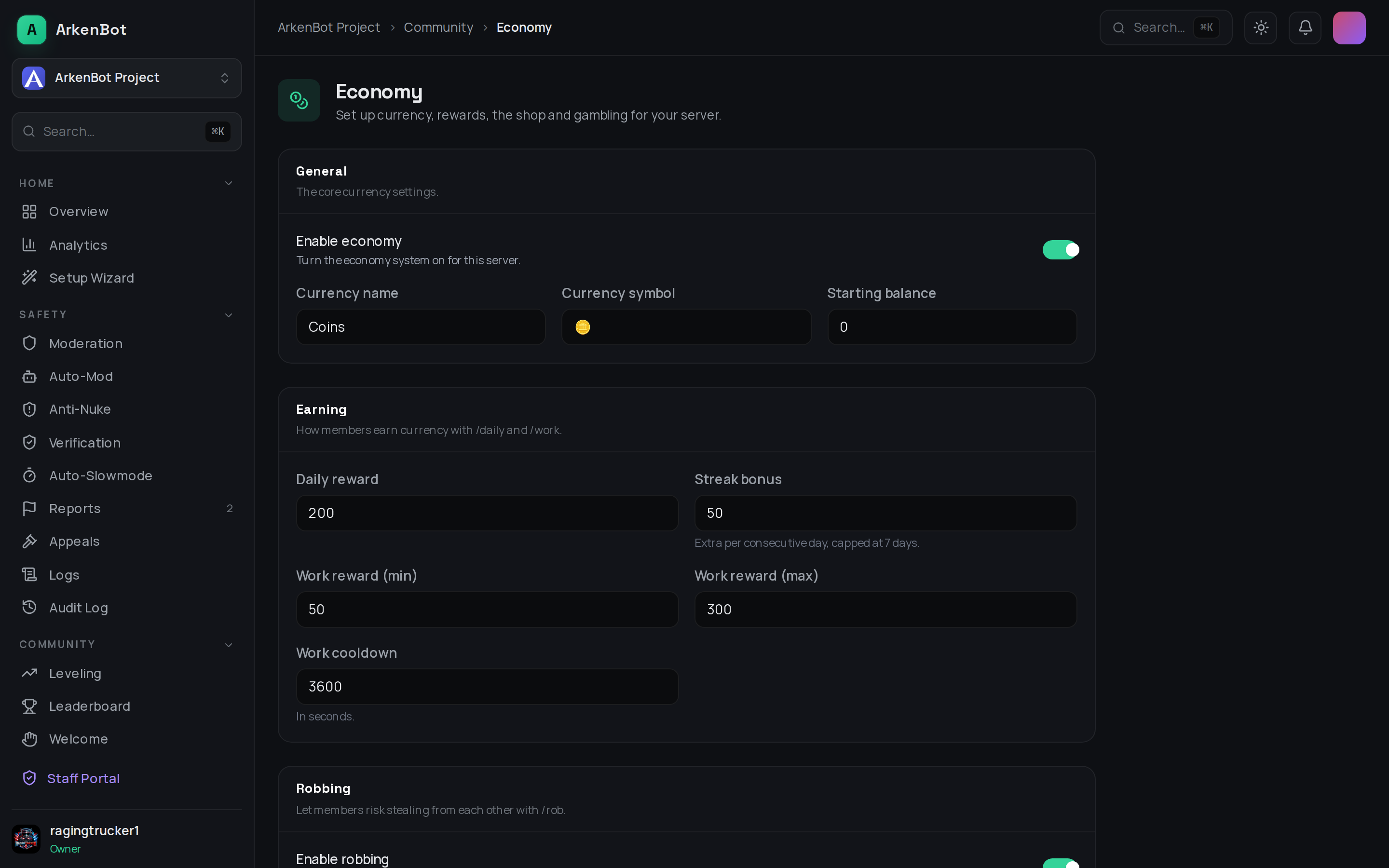
Go to Economy in the dashboard sidebar and toggle Enable economy on. Set your currency name (e.g. "Coins") and symbol (e.g. 🪙).
Configuration
| Setting | Description | Default |
|---|---|---|
| Currency name / symbol | The label and emoji used everywhere | Coins / 🪙 |
| Starting balance | Wallet balance a member starts with | 0 |
| Daily reward | Amount from /daily | 200 |
| Streak bonus | Extra per consecutive daily, capped at 7 days | 50 |
| Work reward (min/max) | Random range for /work | 50–300 |
| Work cooldown | Seconds between /work | 3600 |
| Robbing | Enable /rob, success rate, max steal %, fine %, minimum target wallet, cooldown | On, 40% |
| Gambling | Enable /gamble, and the maximum bet | On, 10000 |
Commands
| Command | What it does |
|---|---|
/balance [user] | Show wallet, bank, net worth and rank |
/daily | Claim the daily reward (with streak bonus) |
/work | Earn a random reward on a cooldown |
/pay <user> <amount> | Transfer currency from your wallet |
/bank deposit|withdraw <amount> | Move currency between wallet and bank (amount, or all) |
/rob <user> | Risk stealing from another member |
/shop view / /shop buy <item> | Browse and purchase items |
/inventory [user] | List owned items |
/trade <user> [coins] [item] | Offer coins and/or an item to another member |
/gamble coinflip|slots|dice|roulette|highlow <amount> | Play a minigame of chance |
/blackjack <amount> | Play a hand of blackjack against the dealer |
/lottery buy <tickets> / /lottery info | Buy tickets for the weekly server lottery, or check the pot |
/richest | View the wealth leaderboard |
/economy give|take|reset|additem|removeitem | Admin controls (Manage Server) |
Games of chance
| Game | How it plays |
|---|---|
/gamble coinflip <amount> | Pick heads or tails — a win pays 0.95:1. |
/gamble slots <amount> | Spin the slot machine for a matching payout. |
/gamble dice <amount> | Beat the house's two-dice roll. |
/gamble roulette <amount> <bet> | Bet on red, black, green, or a number 0–36. |
/gamble highlow <amount> <guess> | Guess whether the next number (1–100) is higher or lower. |
/blackjack <amount> | Hit or stand to beat the dealer without busting. |
The maximum bet for all games is set by the Gambling → maximum bet option in the dashboard.
The Shop
Add items from the dashboard or with /economy additem. Each item has a price and an optional reward role — buying it grants the role automatically. Set a limited stock or leave it blank for unlimited. Purchases are recorded in each member's /inventory.
For role rewards to work, ArkenBot's highest role must sit above the reward role, and the bot needs the Manage Roles permission.