Leveling Setup
The leveling system rewards active members with XP, levels, rank cards, and configurable role rewards.
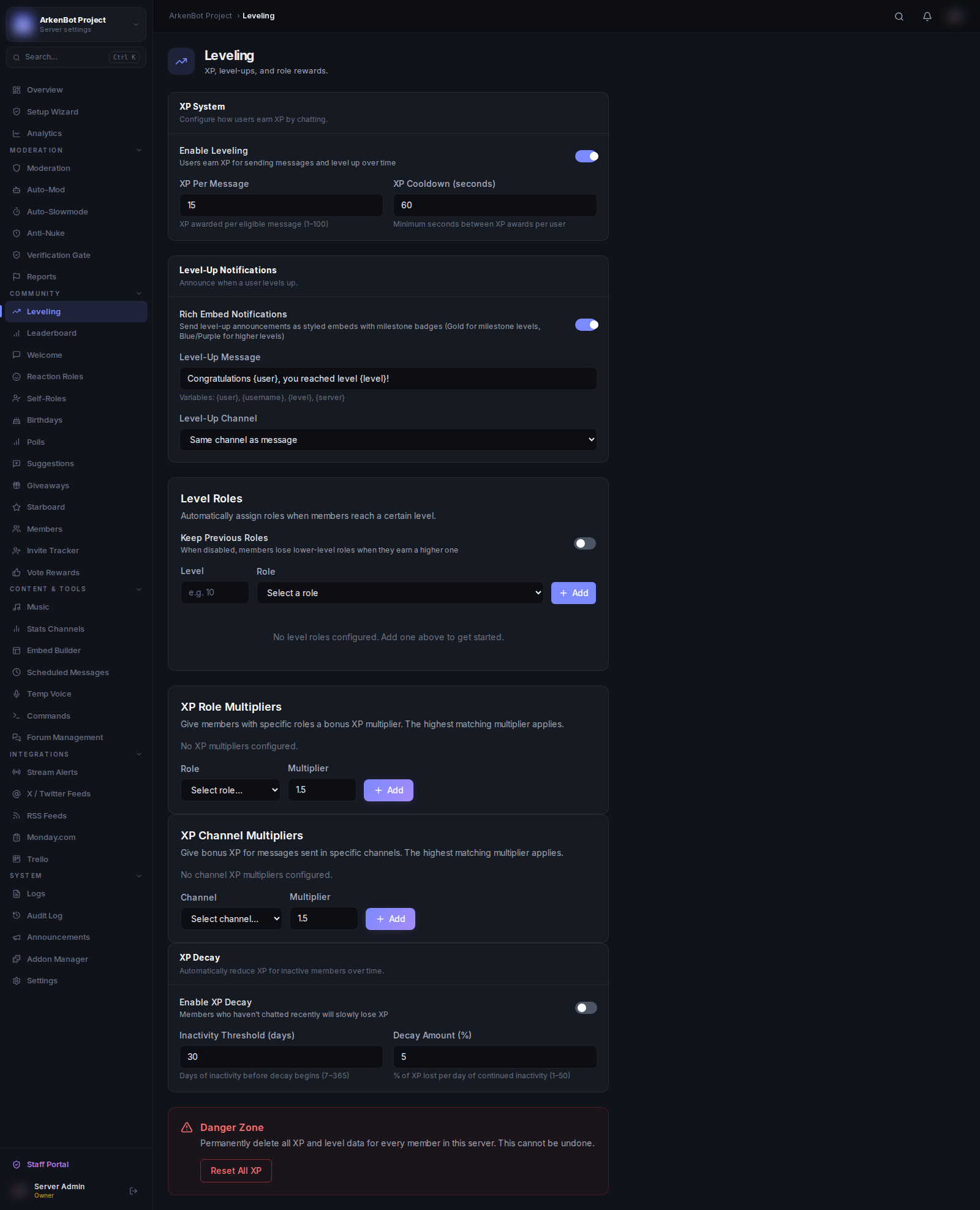
Enabling Leveling
- Go to Settings
- Toggle Leveling on
How XP Works
- Members earn XP for every message they send
- There is a per-user cooldown between XP gains to prevent spam farming
- XP gained per message =
base XP ± 25% (random)×server multiplier - The cooldown resets after the configured interval — sending messages faster than the cooldown earns no extra XP
Dashboard Configuration
Go to Leveling in the sidebar.
XP Multiplier
Set a server-wide multiplier between 0.1× and 10×. All XP earned is multiplied by this value. Use it to speed up or slow down leveling for your community.
Use /leveling multiplier <value> to change it via command.
Level Roles
Automatically assign roles when members reach specific levels.
- Click Add Level Role
- Set the Level and select the Role
- Save
When a member reaches that level, they are automatically assigned the role.
Keep Previous Roles — Toggle this on to let members keep all their level roles as they climb (stack). Toggle it off to only give the highest earned role (replace).
Use /leveling sync-roles to retroactively assign roles to all current members based on their existing levels.
Level-Up Notifications
Configure where and how level-up messages appear:
- Level-Up Channel — Specific channel for level-up pings (leave blank to use the channel the member messaged in)
- Level-Up Message — Custom message template (supports
{user},{level},{server}) - Send as Embed — Send level-up message as a styled embed
The Level Up color in General Settings controls the embed accent color.
Rank Cards
Members can check their rank card with /rank. Rank cards show:
- Current level and XP
- Progress bar to next level
- Server rank position
- Message streak (🔥 for 7+ consecutive days)
Customizing Rank Cards
Members can personalize their own rank card with /rankcard:
/rankcard color #hex— Set a custom accent color/rankcard background <url>— Set a background image (PNG, JPG, or GIF)/rankcard reset— Reset to default style/rankcard preview— Preview the current style
Streaks
Members build a streak by sending at least one message each calendar day. The streak counter is shown on the rank card and profile. Missing a day resets the streak to 0.
Achievements
Members earn achievement badges at various milestones (level thresholds, message counts, streaks). Achievements are displayed on /profile and in the achievements embed.
XP Decay
XP decay automatically reduces XP for members who have been inactive — keeping the leaderboard fresh and rewarding consistent activity.
Enabling XP Decay
Go to Leveling in the dashboard and toggle XP Decay on.
Configuration
| Setting | Default | Description |
|---|---|---|
| Inactivity Threshold | 30 days | Members who haven't earned any XP within this window are considered inactive |
| Decay Percentage | 5% | The percentage of XP removed from each inactive member per day |
How It Works
- Decay runs once per day as a background job
- Only members with XP who haven't been active within the inactivity window are affected
- XP is floored at 0 — decay never goes negative
- Each member's stored level is automatically recalculated after XP is reduced
- Members who send a message reset their inactivity timer immediately
Example: With the defaults, a member who stops chatting for 30 days will lose 5% of their XP each subsequent day until they become active again.
Leaderboard
Use /leaderboard to view the server XP rankings. Pages show 10 members each with medals (🥇🥈🥉) for the top 3.
The dashboard Leaderboard page shows the same data with search functionality.
Leaderboard Time Filters
The dashboard Leaderboard page has three tabs:
- All Time — Full server rankings by total XP
- Weekly — Members active in the last 7 days, ranked by XP
- Monthly — Members active in the last 30 days, ranked by XP
Reset Inactive Members
Click Reset Inactive (90+ days) on the Leaderboard dashboard page to zero out XP, level, message count, and streak for any member whose last activity was more than 90 days ago. A confirmation prompt appears before anything is changed.
XP Role Multipliers
Assign per-role XP bonuses from the Leveling dashboard page under XP Role Multipliers.
- Select a role from the dropdown
- Enter a multiplier (e.g.
2for double XP,1.5for 50% bonus) - Click Add
When a member qualifies for multiple role multipliers, the highest one applies. This is then multiplied on top of the server-wide XP multiplier.
Example: Server multiplier is 1.5×. A member has the Booster role (2×). Their effective multiplier is 1.5 × 2 = 3×.
To remove a multiplier, click the trash icon next to the rule.