Game Server Status
Check and monitor game servers for 40+ supported titles directly from Discord.
Setup
Install the Game Server Status addon from the Addon Manager. No additional configuration is required to start querying servers by address.
Commands
/server status
Check any game server by IP address.
| Option | Required | Description |
|---|---|---|
address | Yes | Server IP or hostname |
game | No | Game type (start typing to search with autocomplete) |
port | No | Port number (uses game default if omitted) |
/server add
Save a server to the guild for quick lookups. Requires Manage Server permission.
| Option | Required | Description |
|---|---|---|
name | Yes | Friendly name for the server |
address | Yes | Server IP or hostname |
game | No | Game type |
port | No | Custom port |
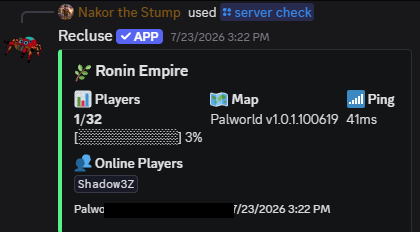
/server check
Check a saved server by its friendly name.
| Option | Required | Description |
|---|---|---|
name | Yes | Saved server name (autocomplete supported) |
/server checkall
Query all saved servers at once and show a status summary table.
/server list
List all saved game servers for the guild.
/server remove
Remove a saved server. Requires Manage Server permission.
| Option | Required | Description |
|---|---|---|
name | Yes | Name of the saved server to remove |
Supported Games
The addon supports 40+ game types including Minecraft, Rust, Valheim, ARK, CS2, Arma 3, FiveM, Palworld, 7 Days to Die, and many more. Start typing in the game option to search with autocomplete.
Palworld
Palworld is a special case: its dedicated servers expose no anonymous query protocol, so status is read through Palworld's official REST API, which requires the server's admin password.
On the server, set these in PalWorldSettings.ini and restart:
RESTAPIEnabled=True
RESTAPIPort=8212
AdminPassword="your-admin-password"
Then add it with /server add and choose Palworld. A private popup asks for the admin password (it is never shown in the channel and is stored encrypted). Use the server's game address — the REST port defaults to 8212.
The REST port must be reachable from the bot. If checks time out, confirm the port is open to the bot and that the server was restarted after enabling the REST API.